6 best Squarespace alternatives in 2026: Real support, flexible templates, without the premium price tag
Squarespace’s templates look great, but they come with strings: the cheapest plan includes a store you may never open, you can’t swap templates on a new site, and there’s no phone line when something breaks. The Squarespace alternatives below make different trade-offs on each, so the best one depends on which limit bothers you most.
Key takeaways:
- Squarespace’s cheapest plan includes online selling whether you use it or not. Wix’s Light plan leaves it out, SiteGround treats selling as an add-on, and GoDaddy’s Starter lists selling too.
- A new Squarespace site can’t change templates, and Wix, Hostinger, and Webflow work the same way. SiteGround Website Builder and WordPress both allow it, and GoDaddy’s Airo AI Builder skips templates entirely.
- Squarespace has no phone line and limits live chat to weekdays. SiteGround covers every plan with 24/7 chat, phone, and tickets, and GoDaddy’s paid plans offer 24/7 phone and chat.
- Platforms meter AI differently, in credits, tokens, or one-time allowances, so check what the allowance actually pays for before you compare.
- Wix and Webflow are free Squarespace alternatives with free plans that never expire, though your site stays on a Wix or Webflow address and Wix adds its ads. Hostinger lets you try it for free, GoDaddy’s free version is for building and exploring, and SiteGround backs its plans with a 30-day money-back guarantee.
Why people look beyond Squarespace
Three limits push people toward other builders, and each one is easy to miss until your site is already built. Here they are:
- You pay more, for a store you may not open. Squarespace’s cheapest plan, Basic at $19 a month billed annually, includes online selling, with a 2% fee on each sale, whether or not you ever open a store. The alternatives below run from $2.99 to $17 a month on 12-month terms, and WordPress is free software that needs hosting.
- Templates are fixed. Squarespace’s help center says you can’t switch templates on version 7.1, the current version. Every 7.1 template shares the same features, so you can restyle and restructure freely, but you can’t swap one template for another.
- Support has gaps. Email runs 24/7, but live chat is Monday to Friday, 4am to 8pm Eastern, and there’s no phone support.
If you’re building a general site, like to rework your design over time, or want help on your own schedule, those limits add up.
What to look for in a Squarespace alternative
Five checks show whether a website builder solves what bothers you about Squarespace. Start with whichever one frustrated you most.
- Design freedom. How much can you change after launch? And does a single editor cover every screen size, with no second layout to keep in sync?
- Ease of use. Dragging elements, chatting with an AI, or writing code: be mindful of your preferences so that building and updating your site isn’t a drag.
- What’s built in. Some extras (analytics, email marketing tools, selling features, a custom domain) ship with the plan, and others cost extra.
- AI. Look at what it actually does for you: draft a full site from a description, or help with copy and images while you work. Then see how it’s metered, since credits can reset each month or run out for good after a one-time allowance.
- Support and infrastructure. Compare the channels (chat, email, phone) and the hours they’re staffed. Then compare the web hosting basics: storage caps, security like SSL, and backups.
The best Squarespace alternatives compared
These six general-purpose builders cover a range of needs and budgets: SiteGround Website Builder, Wix, Hostinger, WordPress, Webflow, and GoDaddy. Here’s how they stack up on price, design freedom, AI, and support.
| Platform | Price | Free to try | Design freedom | AI | Support |
| SiteGround Website Builder | $2.99/mo on a 12-month term (StartUp); renews at $17.99 | 30-day money-back guarantee | Start with AI, a template, or from scratch; grid editor; template switching after launch; automatic mobile optimization | AI Wizard drafts your site; AI tools for text and image (20,000 free tokens a month) | 24/7 chat, phone, and tickets on every plan |
| Wix | $17/mo (Light, no selling) | Free plan, no time limit; Wix ads and a Wix-branded address | Start with AI or a template; drag-and-drop editor; template fixed once chosen | AI generates pages and helps as you edit (Harmony editor) | 24/7 phone callbacks; live chat weekdays |
| Hostinger | $3.99/mo on a 12-month term; renews at $10.99 | Free to try, no card; publishing needs a paid plan | Start with AI or a template; drag-and-drop editor, mobile editing; template fixed once chosen | 5 to 15 one-time AI credits | 24/7 AI chat; no phone |
| WordPress | Free software, plus hosting and a domain | Software is free but hosting isn’t | Switchable themes, block editor, full code access | Plugins and connectors you add | Your host or community forums |
| Webflow | $15/mo (Basic); free Starter plan | Free plan, no time limit; publishes to a webflow.io address | Detailed visual control, a separate design per screen size; templates only start new projects | AI features run on credits; 200 a month on the free workspace | Help center and community forum |
| GoDaddy | $9.99/mo (Starter); lists online selling | Free plan to build and explore, no card needed | Chat-based, small edits section by section; no templates; code download | 150 credits a month on Starter | 24/7 phone and chat on paid plans |
Pricing, plan names, and features in this comparison reflect what was publicly available as of October 2026. Prices are each platform’s lowest-priced paid plan for a general website, on 12-month billing, in USD, and renewal rates can differ. Plans change often, so confirm current details with each platform before you decide.
SiteGround Website Builder
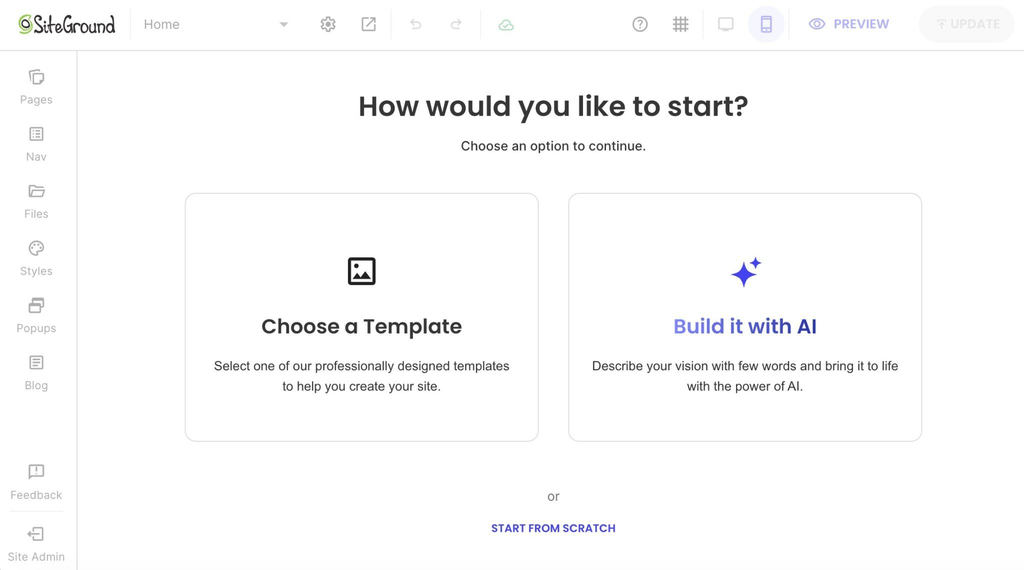
SiteGround’s web hosting plans include the Website Builder, so you can describe your site to AI, pick a template, or build from a blank page, and you can change your template after launch.
- Cost: StartUp, the entry hosting plan, is $2.99 a month if you prepay for 12 months, then renews at $17.99. It hosts one site and includes the Website Builder, a free domain for the first year (.com, .org, or .net), and a 30-day money-back guarantee. GrowBig, at $4.99 a month renewing at $29.99, hosts unlimited sites.
- Design and editing: All three starting points land you in one grid editor, where elements can be dragged, resized, and layered wherever you like. Customizable templates come with pre-built sections you can drop in. If you change your mind later, Change Template can apply only the new look and leave your content alone; its other options swap in new content too. Layouts adapt to any screen size on their own, so you never maintain a second phone version.
- AI: Describe your site to the AI Wizard and it builds a first draft that you can then edit in the same builder; for now, the Wizard doesn’t use any tokens. Inside the editor, AI writing and image tools help with copy and pictures as you go, running on a free allowance of 20,000 tokens a month.
- Support: In-house experts answer by chat, phone, and ticket around the clock on every plan.
- The catch: Renewal costs are higher than the first term. There’s also no app marketplace, so marketing tools and analytics are built in.
Wix
Wix offers a drag-and-drop editor, a free plan that never expires, and a newer AI-assisted editor called Harmony.
- Cost: Light is $17 a month billed annually and doesn’t include selling. Core, at $29, is Wix’s cheapest plan that does, and yearly plans include a voucher for a free first-year domain if you register a new one through Wix. While the free plan never expires, note that your site shows Wix ads, lives at a Wix-branded address (like yourname.wixsite.com) rather than your own domain, and can’t sell products.
- Design and editing: Wix has the same limit Squarespace does: once you’ve picked a template, you can’t change it, in the Wix Editor or in Harmony sites created with AI. The Wix Editor handles phones in a separate mobile editor, while Harmony adjusts automatically.
- AI: Harmony lets you start from a template or have AI generate pages and sections, then pairs drag-and-drop with built-in AI. You can ask it for help, edit everything by hand, or do both.
- Support: Callbacks are available around the clock in English, and live chat runs on weekdays. Wix has no public phone number, so you request the call.
- The catch: Wix’s editors don’t connect: a site built in the Wix Editor can’t be moved to Harmony or Studio, so getting Harmony’s automatic phone layout means starting a new site.
Hostinger
Hostinger is a low-cost option: a drag-and-drop editor plus an AI builder, with plans from roughly $4 a month on a 12-month term.
- Cost: Premium runs $3.99 a month if you pay for 12 months (around $3 on a 48-month commitment), then renews at $10.99. A free domain covers the first year, and paid plans come with a 30-day money-back guarantee.
- Design and editing: You can let the AI build from a prompt or start from a template, and the editor lets you drag elements wherever you want, with a mobile editing mode for tuning the phone view. If you start from a template, that choice is permanent: once a site exists it can’t be switched, so a new template means starting a new site and moving your domain.
- AI: Credits get spent whenever you create or edit by chatting with the AI. Premium includes 5 and Unlimited includes 15, once, with no monthly refill. Editing by hand with drag and drop uses no credits, and you can top up without changing plans.
- Support: AI chat runs around the clock, and there’s no phone line. Unlimited adds priority 24/7 expert support.
- The catch: Hostinger has no free plan, and the renewal rate is higher than the first-term price.
WordPress
WordPress.org hands you complete control over design and code, along with complete responsibility for keeping the site up. The software is free, but you must install it on hosting you’ve set up and picked yourself. (WordPress.com, by contrast, is a hosted service that takes care of hosting and updates, though what you get there depends on your plan.)
- Cost: The software is free, but hosting and a domain are extra, and depend on you for setup.
- Design and editing: Change themes whenever you want, build pages with the block editor, and reach into the code for anything else. Many premium themes cost extra, and features like forms or SEO tools usually come from plugins.
- AI: AI arrives through plugins and connectors that you install.
- Support: WordPress doesn’t provide support itself, so you depend on your host’s team, community forums, and plugin support (if there is any).
- The catch: You’re responsible for updates, security, and backups.
Webflow
Webflow suits people who want fine control over how a page looks, from spacing and fonts to the full layout, with separate designs for desktop, tablet, and phone. You build visually, and Webflow generates the code behind the scenes.
- Cost: Starter costs nothing and never expires, but your site sits at a free webflow.io address, not your own domain, and holds just two pages. Basic ($15 a month, billed yearly) lets you connect your own domain, though it can’t run a blog or other regularly updated content. Premium ($25 a month, billed yearly) adds the content management system (CMS) that a blog requires.
- Design and editing: Desktop, tablet, and phones (held sideways or upright) each get their own design.
- AI: AI features in Webflow run on credits, and the free workspace includes 200 a month.
- Support: A help center and a community forum are the main routes to help.
- The catch: Designers will feel at home, but beginners should expect a learning curve. A template can only start a new project, so you can’t apply one to a site that’s already built.
GoDaddy
GoDaddy’s Airo AI Builder is built around chat: tell it what you want, let the AI build the site, then adjust it by chatting, with a few small edits available section by section.
- Cost: Starter is $9.99 a month on annual billing and targets portfolios, personal sites, and creators, while Professional is $24.99. Annual plans include a free custom domain for the first year, and a free plan offers 50 AI credits a month to explore with.
- Design and editing: Airo has no templates and no drag-and-drop editor. Changing text and images section by section doesn’t cost credits, and your code can be downloaded at any time.
- AI: Credits are what the AI spends to build your site or web apps. They refill monthly (150 on Starter, 300 on Professional), and editing text and images yourself doesn’t use any.
- Support: Phone and chat support is available 24/7 on every paid plan.
- The catch: Bigger changes happen through chat and draw on those monthly credits, so heavy users could run out before the month ends.
Which Squarespace alternative actually fits your project
Find the row that describes what you can’t give up, then check the platforms listed beside it.
| You value… | Consider |
| Swapping templates after launch | SiteGround Website Builder, WordPress |
| A general site with no store features | SiteGround Website Builder, Wix (Light) |
| Reaching support by phone | SiteGround Website Builder, GoDaddy, Wix (by callback) |
| A separate design for each screen size | Webflow |
| Website building almost entirely by chatting with AI | GoDaddy |
| Full control over code and hosting | WordPress |
| A free plan you can publish on, with limits | Wix, Webflow |
| A free domain for the first year with a yearly plan | SiteGround, Hostinger, GoDaddy, Wix |
| A free trial before you pay | Hostinger, GoDaddy |
| A 30-day money-back guarantee | SiteGround Website Builder, Hostinger |
| A free domain for the first year with a yearly plan | SiteGround Website Builder, Hostinger, GoDaddy, Wix |
| A low monthly price | Hostinger, GoDaddy, SiteGround Website Builder |
| Built-in AI to draft your site, drag-and-drop editing, and templates you can swap later | SiteGround Website Builder |
Where SiteGround Website Builder fits
Each of these alternatives to Squarespace fixes a different frustration. They split on what happens when you change your mind: only SiteGround and WordPress let you swap templates after launch.
SiteGround’s web hosting plans include the Website Builder and address each of those limits: you only pay for a store if you want one, you can change templates on a live site, and help is available 24/7 by chat, phone, or ticket. Start with AI, a template, or a blank page, and create your site your way from start to finish. Plans start at $2.99, with a free domain for the first year and a 30-day money-back guarantee.
More than hosting. More ways to grow.
From your first domain to your next big milestone, SiteGround helps you move forward. Create your website, find your hosting, and grow with ecommerce, email marketing, and AI tools. 
Frequently asked questions
The main downsides are a cheapest plan that includes selling whether you sell or not, templates you can’t swap on a new site, and support with no phone line and live chat on weekdays only.
Squarespace has no free plan, only a 14-day trial, but Wix and Webflow both have free plans that never expire. Wix keeps its ads and a Wix-branded address, and Webflow’s publishes to a webflow.io address and holds two pages. GoDaddy’s free plan is for building and exploring, Hostinger offers a free trial, SiteGround backs its plans with a 30-day money-back guarantee, and WordPress is free software that needs paid hosting.
It depends on what you can’t give up. SiteGround and WordPress let you change templates after launch, Webflow gives each screen size its own design, GoDaddy builds by chat, and Hostinger and SiteGround both start under $4 a month on 12-month terms.




Comments ( 0 )
Thanks! Your comment will be held for moderation and will be shortly published, if it is related to this blog article. Comments for support inquiries or issues will not be published, if you have such please report it through our official channels of communication.
Leave a comment
Thanks! Your comment will be held for moderation and will be shortly published, if it is related to this blog article. Comments for support inquiries or issues will not be published, if you have such please report it through our official channels of communication.