AI Agent for WordPress vs WordPress.com AI Agent: Which is better for site management?
-
- The real difference isn’t assistant versus agent
- What WordPress.com offers: WordPress Agent and MCP
- What AI Agent for WordPress actually includes
- AI Agent for WordPress vs WordPress.com’s WordPress Agent on everyday admin tasks
- The three differences that actually decide it
- Which one fits your setup?
- Choosing between AI Agent for WordPress and WordPress.com AI Agent
- FAQs
You’ve got a WordPress site, a list of admin jobs that never quite gets shorter, and two AI agents offering to take them off your hands. Both write, both edit, both promise to save you an afternoon a week. So which one should you actually use?
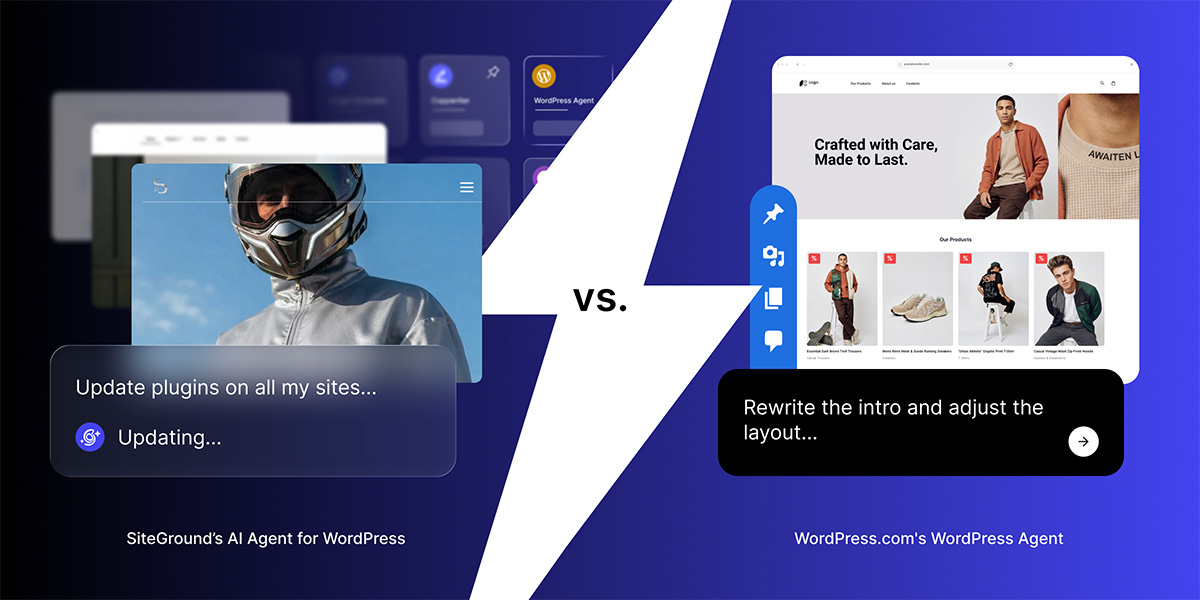
AI Agent for WordPress vs WordPress.com AI Agent turns on how much of your site each one can actually work with. SiteGround’s AI Agent for WordPress runs the whole admin: content, plugins, users, settings, WooCommerce, and SEO. WordPress.com’s AI Agent, officially called WordPress Agent, writes and designs inside the editor, on sites hosted by WordPress.com.
Key takeaways:
- AI Agent for WordPress vs WordPress.com AI Agent is a question of reach. One attaches to WordPress installations wherever they run, including sites you host elsewhere. The other works inside the WordPress.com editor, on WordPress.com-hosted sites.
- WordPress.com’s agent is better at design and images. It restyles layouts, changes colors and fonts in the full site editor, and generates images in the Media Library. SiteGround’s AI Agent for WordPress works differently on design and doesn’t match it there.
- SiteGround’s AI Agent for WordPress covers far more of the admin. Posts, taxonomy, custom fields, plugins, users, settings, on-page SEO, and WooCommerce, rather than post body content and design alone.
- Only AI Agent for WordPress works across multiple sites. It lets you run a single instruction across every site you’ve connected to your account.
The real difference isn’t assistant versus agent
Comparisons like this usually get stuck on whether a tool counts as an assistant or an agent. That’s the wrong way to approach it, because both take an instruction in chat and change your site.
The important part is which parts of your site each one can actually touch, and which sites it can touch at all.
WordPress Agent works on the page you have open, in the WordPress.com editor, and only on sites hosted by WordPress.com. It writes and restyles. It doesn’t install plugins, add users, change settings, or go near WooCommerce.
AI Agent for WordPress works across the whole admin. It treats posts and pages as objects rather than just text, so it can create, publish, and delete them, and it also handles categories, custom fields, media, plugins, themes, users, settings, on-page SEO, and WooCommerce. It runs on any WordPress site you connect, whoever hosts it, and on several of them at once.
What WordPress.com offers: WordPress Agent and MCP
WordPress.com ships two separate AI routes, and they get confused with each other constantly. Separating them is the first useful thing this comparison can do.
WordPress Agent is Automattic’s own agent, built into the WordPress.com editing experience. MCP is a connection layer that lets an AI assistant you already pay for, such as Claude or ChatGPT, work on your WordPress.com site from outside. One is a product; the other is a doorway. You’ll also see the first described as the WordPress.com AI Agent or WordPress.com AI Assistant, though Automattic’s own name for it is WordPress Agent. A third thing, the official WordPress AI plugin, is different again and covered in our WordPress.com agent vs official plugin comparison.
WordPress Agent, inside the editor
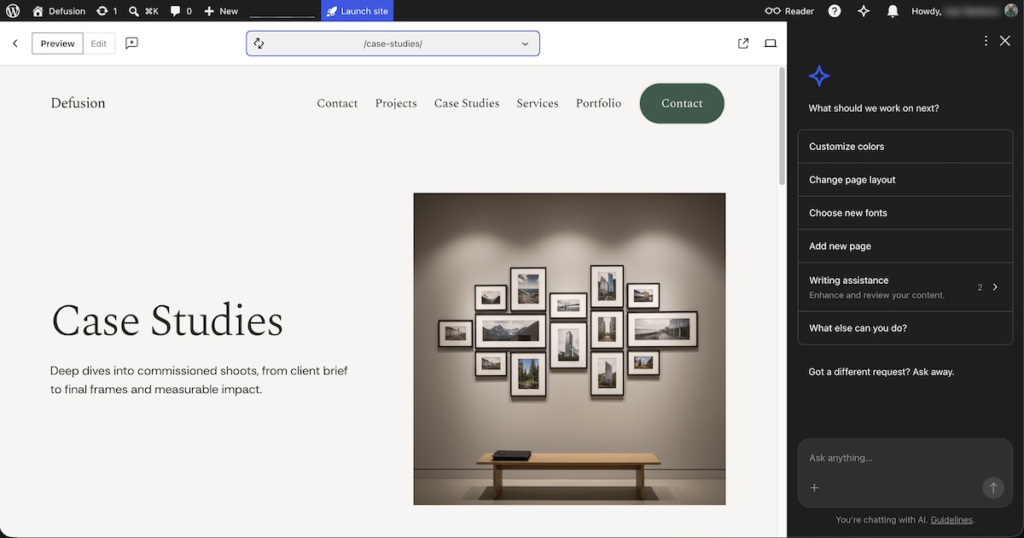
WordPress Agent opens from the four-pointed star in the admin bar while you’re editing a post or page, working in the full site editor, or in the Media Library. Ask it to rewrite a paragraph, restyle a section, suggest fonts, or generate an image, and it does that work in the canvas in front of you. You can also reach it through email, Telegram, and Slack.
There’s one limitation worth knowing before you plan around it. In a blank post, we asked the agent: “Write a short post about why it’s important to have a quality photo camera light. 100 words.” It wrote 100 words into the post body. Then we asked for a title. It replied that the title is a separate post field rather than body content, and told us to type it ourselves.
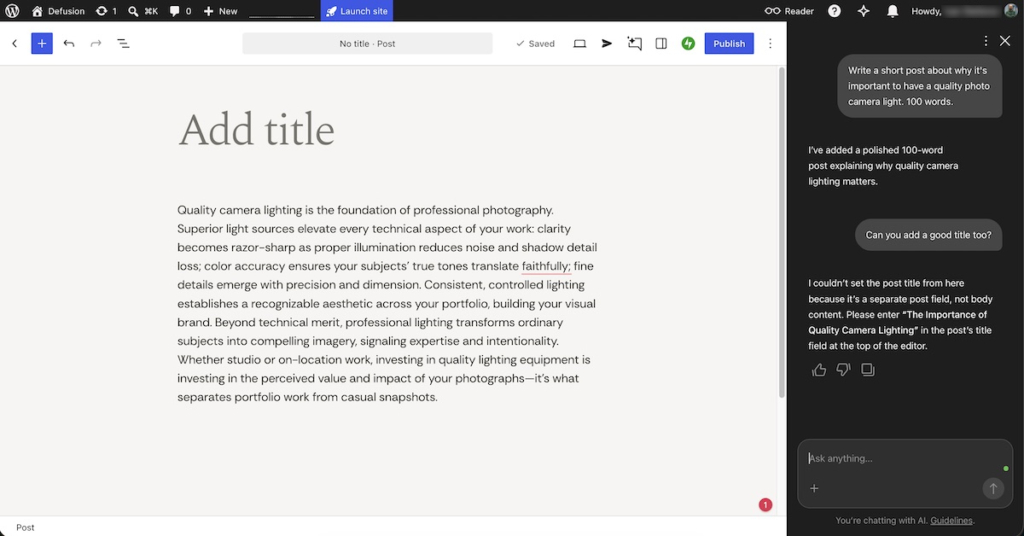
WordPress Agent acts on body content inside an editor you already have open. It doesn’t act on the post as an object. Ask from somewhere other than an editor, such as the Plugins screen, and it will tell you it has no tool to create or save posts at all. That’s a coherent design choice for an in-editor assistant, and it’s also the line between helping you write and running your site.
One more limit: the agent only appears in the editor on block themes. On a classic theme you keep image generation in the Media Library, but the in-editor agent isn’t there.
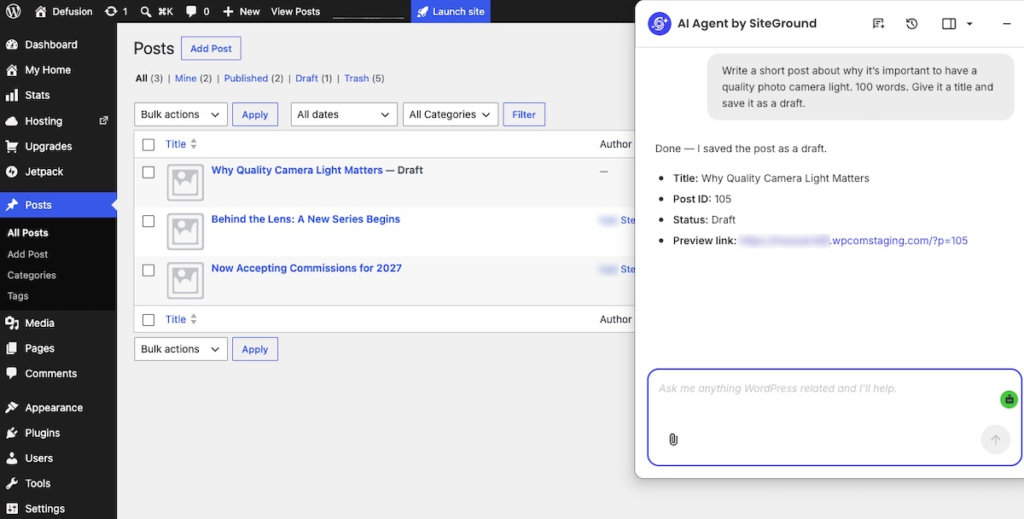
Given the same request, SiteGround’s AI Agent for WordPress writes the post, sets the title, and saves it as a draft.
MCP connections for external AI agents
MCP is the other route. Connect Claude, ChatGPT, or another MCP client to your WordPress.com account and that assistant can read, write, and manage the site, with changes needing your approval and new posts defaulting to draft. It does more with your posts than WordPress Agent does, but you pay for the AI assistant separately and wire it up yourself.
If you want to learn the details of how this works, WordPress core AI vs hosted AI covers it properly.
Where it stops: the WordPress.com account boundary
Both routes are built around a WordPress.com account. WordPress Agent runs on sites hosted by WordPress.com, on a Personal plan or above. MCP connects to the sites in that same account. Automattic documents one narrow exception, a self-hosted site linked through Jetpack on a Jetpack AI or Jetpack Complete plan, but that means two more purchases and a setup session, and it isn’t something they push.
Good to know: neither WordPress Agent nor AI Agent for WordPress is a page builder. If your site is built in Elementor or Divi, both work around that layout rather than inside it, and you’ll still open the builder for structural design work.
What AI Agent for WordPress actually includes
SiteGround’s AI Agent for WordPress starts from the other end. It isn’t tied to the editor, and you can use it two ways: as a chat pop-up inside the WordPress admin of any site you’ve connected, or from the AI Studio dashboard when you want to work across several sites at once.
Connecting your sites, wherever they’re hosted
AI Agent by SiteGround is the plugin you install on your WordPress site, connect it to your SiteGround account, and it works from inside your WordPress admin.
Sites hosted with SiteGround connect in one click. Everywhere else, you install the plugin and add a connection key, and you’re set. You can use AI Agent across externally hosted WordPress sites without moving your hosting anywhere.
Power Mode and what needs your confirmation
An agent that can delete things should ask first. Power Mode is off by default, and the agent stops and checks with you before anything that would be hard to undo: deletions, user management, site settings, bulk operations, WooCommerce changes, and core updates. We have a separate guide if you want to know exactly what needs your confirmation.
AI Agent for WordPress vs WordPress.com’s WordPress Agent on everyday admin tasks
Here’s how the two handle the jobs that come up most often in a WordPress admin.
| Dimension | WordPress.com’s WordPress Agent | AI Agent for WordPress |
|---|---|---|
| Where you use it | Inside the WordPress.com post editor, full site editor, and Media Library, plus email, Telegram, and Slack | A chat pop-up inside the WordPress admin of any connected site, or SiteGround’s AI Studio for working across sites |
| Which sites it reaches | Sites hosted on WordPress.com, on a Personal plan or above | WordPress installations on any host, connected through the AI Agent by SiteGround plugin |
| Writing a post | Writes body content into an editor you already have open | Creates the post, writes it, sets the title, and publishes it |
| Categories and tags | Not listed among its capabilities | Creates and applies categories, tags, and custom taxonomy terms |
| Custom post types and fields | Not supported | Works fully with existing custom post types and custom fields |
| Media | Generates images from a description and edits existing ones in the Media Library | Uploads and generates images, and updates fields such as alt text across many images at once |
| Design | Changes colors, fonts, and section layouts in the full site editor | Reads block structure and theme styles, and can build a full page from a prompt |
| Code | Declines, citing the risk of editing theme files | Writes snippets on request, such as a PHP function for your theme. You paste it in yourself |
| Plugins and themes | Finds, installs, and manages plugins | Installs, updates, and removes plugins and themes, and checks compatibility |
| Users and settings | Not listed among its capabilities | Manages users, roles, menus, permalinks, and site settings |
| On-page SEO | Not listed among its capabilities | Works on on-page SEO across your content |
| Speed and security | Not listed among its capabilities | Spots caching and speed issues, audits for vulnerabilities, finds plugin conflicts, and tells you what to fix |
| WooCommerce | No WooCommerce support | Manages products including bulk edits, plus orders and order status, coupons, and sales reports |
| Multiple sites | One site at a time | One instruction can run across every site you’ve connected |
Taken as a whole, AI Agent for WordPress covers considerably more of a WordPress admin. WordPress Agent is stronger in a narrower place: design and images.
Where WordPress Agent is ahead: restyling a section, changing a site’s colors and fonts, generating and editing images in the Media Library, and the Telegram, Slack, and email channels that let you ask for a change without opening WordPress. AI Agent for WordPress approaches design differently and doesn’t offer those chat channels.
Pro tip: open your WordPress admin and look at which screens you’ve actually visited this month. If it’s mostly the editor, an in-editor assistant covers you. If Plugins, Users, Settings, or WooCommerce are in there, you need something that can reach them.
The three differences that actually decide it
Most of those differences you could live with either way. Three things aren’t. Any one of them can rule a product out before you get to the rest.
Whether it can reach the site you already have
WordPress Agent runs on sites hosted by WordPress.com. If your site is anywhere else, that settles it, however good the agent is.
AI Agent for WordPress attaches to the WordPress installation rather than to a hosting platform, so it works on your site wherever you host it. If your site is already up and running somewhere, that’s usually where the comparison ends. If you’re weighing other host-provided agents on the same question, we’ve also compared hosted-platform AI management and looked at host-integrated WordPress agents compared.
WooCommerce: store operations or content help
If you run a store, the answer is quick. WordPress Agent has no WooCommerce support. It’s a content, design, and image assistant, and your store sits outside it.
AI Agent for WordPress handles products, including bulk edits across your catalog, plus orders and order status, coupons, and sales reports, and it reads variable product information. Editing variations is limited, and tax rates, shipping zones, and payment gateways stay outside what it does.
The practical version: asking “which orders from last week are still unfulfilled” is a question only AI Agent for WordPress can answer.
Managing several WordPress sites at once
Access and execution aren’t the same thing. Switching between sites quickly is still switching between sites.
WordPress Agent works within the site you’re in. With AI Agent for WordPress, you connect each of your WordPress sites to your SiteGround account once, and from then on a single instruction can act on all of them at once. In our testing, one request updated a plugin across your connected sites, reporting which ones it changed and which it skipped, and another added an editor user to each client site, without opening any of them.
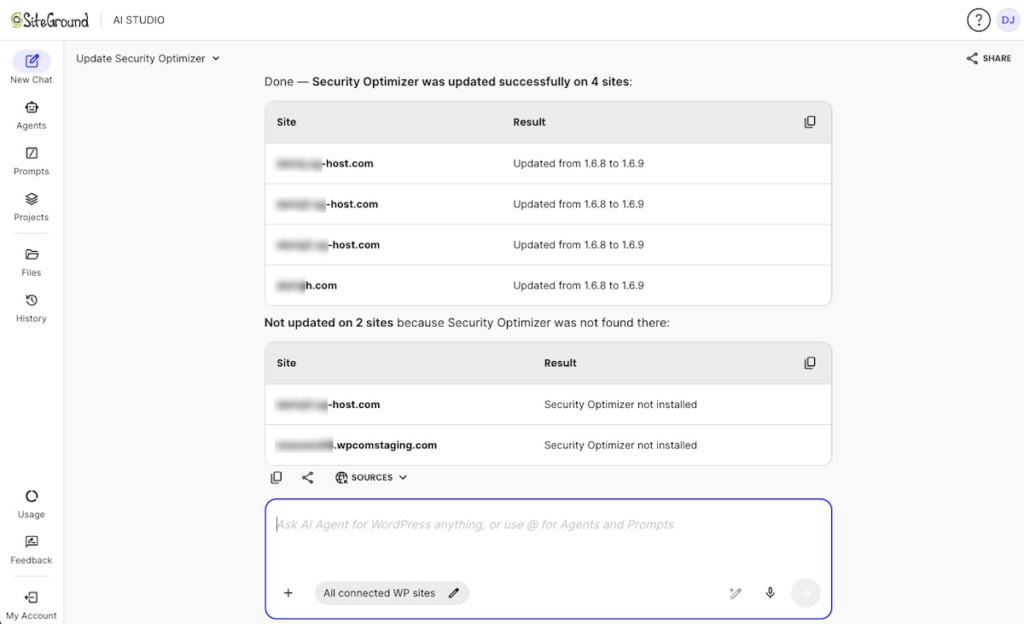
If you look after client sites spread across different hosting companies, the agency side of this is covered in how to coordinate independent WordPress installs.
Pro tip: think about the last plugin update you ran. If you did it once, this doesn’t matter much. If you did it four times because you run four sites, that repetition is the thing you’re buying your way out of.
Which one fits your setup?
The honest answer depends less on the products than on where your sites live and what you spend your admin time doing.
What each one requires before you start
Neither option is free in any lasting way, and it’s worth knowing that up front.
WordPress.com’s free tier doesn’t include WordPress Agent at all. It’s available on Personal, Premium, Business, and Commerce plans. MCP is available on all tiers including free, but on the free tier it stops after 30 days, and on a self-hosted site it needs a Jetpack AI or Jetpack Complete plan. Reaching a WordPress.com site through MCP also assumes you already pay for the assistant you’re connecting.
AI Agent for WordPress needs a SiteGround account, as above. One account covers every site you connect, wherever each one is hosted.
Both let you try before committing: 30 days of MCP on WordPress.com’s free tier, or a 14-day AI Studio trial for AI Agent for WordPress.
You’re on WordPress.com and staying there
If you’re on a paid WordPress.com plan, WordPress Agent is the sensible starting point. It’s already in your editor, there’s nothing to install or connect, and it’s good at the work you’re most likely to want: rewriting a section, restyling a page, generating an image for a post. On the free tier you don’t have it at all, and you’d need to upgrade first.
AI Agent for WordPress is still worth adding if your admin runs past writing and design. If you want bulk work across your media library, on-page SEO across the whole site, a WooCommerce store, or anything in Users and Settings, that’s work WordPress Agent doesn’t do.
You run self-hosted WordPress, on SiteGround or anywhere else
SiteGround’s AI Agent for WordPress is the one that can reach your site. WordPress Agent can’t: it only runs on sites hosted by WordPress.com. If your admin time goes on plugins, users, settings, and orders rather than wording, that gap matters more than any feature comparison.
You manage a portfolio spread across several hosts
Only AI Agent for WordPress can do this. WordPress Agent works on one WordPress.com site at a time, so a portfolio spread across different hosting companies is out of its reach entirely. Connect those sites to your SiteGround account and one instruction updates all of them.
Choosing between AI Agent for WordPress and WordPress.com AI Agent
AI Agent for WordPress vs WordPress.com AI Agent isn’t really a contest between two feature lists. It’s a question about your setup.
If everything you run is on WordPress.com and your admin time goes on words and design, WordPress Agent is already there and it’s good at that work. Adding anything else would be solving a problem you don’t have.
If your sites live elsewhere, or you look after more than one, the question answers itself before the features matter. SiteGround’s AI Agent for WordPress attaches to WordPress installations wherever they run, so it can do the job. WordPress Agent stops at the edge of WordPress.com, so it can’t.
Running a store makes the choice simpler still. WooCommerce is the clearest gap between the two: AI Agent for WordPress works with your products and orders, and WordPress Agent has no WooCommerce support at all.
FAQs
The difference between AI Agent for WordPress and WordPress.com’s AI Agent, which Automattic calls WordPress Agent, is where each one operates. WordPress Agent works inside the WordPress.com editor, on sites hosted by WordPress.com. AI Agent for WordPress connects to WordPress installations, including sites hosted elsewhere, and can act across several of them from one place.
For an existing WordPress site that isn’t hosted on WordPress.com, AI Agent for WordPress is the workable option, because WordPress Agent only runs on WordPress.com-hosted sites. If your site is already on WordPress.com and staying there, WordPress Agent is built into the editor and needs no extra setup.
Yes. You install the AI Agent by SiteGround plugin, connect the site to SiteGround AI Studio with a connection key, and manage it from there. The plugin is free, but you’ll need a SiteGround account. Sites hosted on SiteGround connect in one click instead.
No. WordPress Agent works in the WordPress.com editor, on sites hosted by WordPress.com. Automattic documents one narrow exception involving Jetpack on a paid Jetpack AI or Jetpack Complete plan, but for a self-hosted site that means two more subscriptions and a setup session before anything happens.
AI Agent for WordPress is the one built for managing multiple WordPress sites. Connected installations are managed from a single AI Studio workspace, and one instruction can act across all of them. WordPress Agent works within one WordPress.com site at a time.
Yes, there are several, and they split into different jobs. Writing assistants generate content, SEO plugins optimize it, and management agents carry out site operations. For managing a site you already run, the practical question is which agent can reach your installation. If you’re mapping the category, we’ve compared AI Agent for WordPress and Jetpack AI, and the difference between AI plugins and AI agents is a useful place to start.




Comments ( 0 )
Thanks! Your comment will be held for moderation and will be shortly published, if it is related to this blog article. Comments for support inquiries or issues will not be published, if you have such please report it through our official channels of communication.
Leave a comment
Thanks! Your comment will be held for moderation and will be shortly published, if it is related to this blog article. Comments for support inquiries or issues will not be published, if you have such please report it through our official channels of communication.