AI Agent for WordPress vs WooCommerce AI plugin: Store operations or specialized AI?
-
- What WooCommerce AI plugins do and what AI Agent for WordPress is built for
- AI Agent for WordPress vs WooCommerce AI plugin: how they compare
- The differences that decide it
- What AI Agent for WordPress won’t do in your store
- Can you use a WooCommerce AI plugin and AI Agent for WordPress together?
- Which AI tool fits your WooCommerce store?
- WooCommerce AI plugins or WordPress-wide management?
- Frequently asked questions
WooCommerce store owners looking for AI help find hundreds of plugins under the same label, and it’s hard to tell which ones would actually save time.
A WooCommerce AI plugin is any add-on that brings AI into a WooCommerce store. Today the label covers five kinds of tools: product content generators, shopper chat and support, AI search and recommendations, marketing automation, and store agents that change products and orders on request.
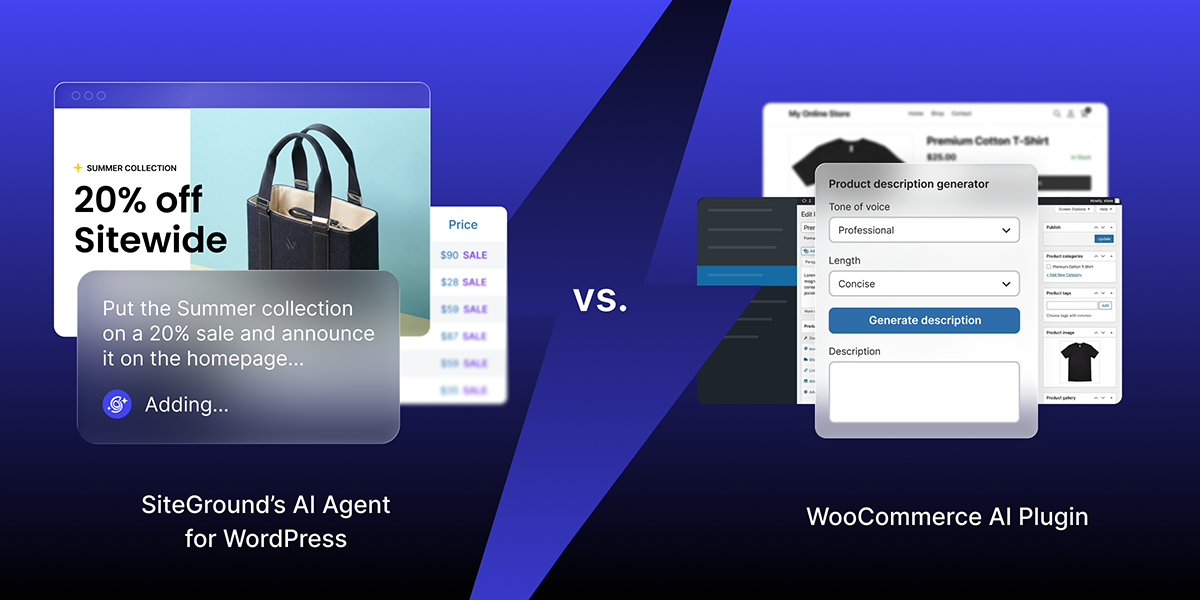
AI Agent for WordPress vs WooCommerce AI plugin is mostly about one question: do you need AI that helps your shoppers, or AI that helps you run your store and website? Specialized plugins usually do the first better, while SiteGround’s AI Agent for WordPress does the second by chat, from your WordPress admin.
Key takeaways:
- AI Agent for WordPress vs WooCommerce AI plugin is about who the AI helps. Most WooCommerce AI plugins help your shoppers or handle one store task, while AI Agent for WordPress helps you run the store and the website around it.
- Specialized plugins do shopper-facing work better. A chat assistant answers questions on your storefront day and night, and AI search helps shoppers find products, which AI Agent for WordPress doesn’t do.
- AI Agent for WordPress can run a whole promotion from one request. It can create a coupon, announce it on your homepage, build a Sale page, and add that page to your main menu.
- Both have limits. Most WooCommerce AI plugins stick to one job inside the store, while some store settings are still out of reach for AI Agent for WordPress, such as order notes, product variations, and tax, shipping, and payment settings.
What WooCommerce AI plugins do and what AI Agent for WordPress is built for
WooCommerce AI plugins split into five jobs, and each job helps either your shoppers or you. Knowing which job a plugin does tells you more than its feature list:
- Product content generators. These write product descriptions, short descriptions, tags, and alt text, usually from a button in the product editor. Most are small, single-purpose plugins or WooCommerce Marketplace add-ons.
- Shopper chat and support. A chat assistant sits on your storefront and answers visitors. For example, Tidio, a live chat platform for online stores, includes an AI assistant called Lyro that answers shoppers and recommends products.
- AI search and recommendations. These replace or extend your store search and suggest related products. Doofinder offers AI-driven product search and recommendation carousels, and it runs through a Doofinder account.
- Marketing automation. These tools send abandoned cart emails, follow-ups, and win-back messages based on what shoppers do. Some of the best-known, such as AutomateWoo, are rules-based rather than AI-driven.
- Store agents. A WooCommerce AI agent changes products and orders when you ask it to, usually through a general AI assistant you connect to your store, such as Claude or ChatGPT. Suites such as StoreAgent also bundle several of these jobs together, which we look at when we compare SiteGround with a WooCommerce-native agent.
Three of these five categories help your shoppers directly. Chat, search, and recommendations all happen on the storefront, in front of visitors. The other three help you run the store.
Broad AI plugins with WooCommerce tools, such as AI Engine, AI Puffer, and Jetpack AI, cover several of these jobs inside one plugin. If that’s what you’re weighing, see a multi-feature WordPress AI plugin alternative in our AI Puffer comparison.
AI Agent for WordPress is built to help the store owner, not the shopper. You type a request into a chat pop-up in your WordPress admin, or into the SiteGround AI Studio dashboard, and it does the work. It covers WooCommerce products, prices, coupons, orders, and sales reports, plus the WordPress site around the store: posts, pages, menus, plugins, users, and settings.
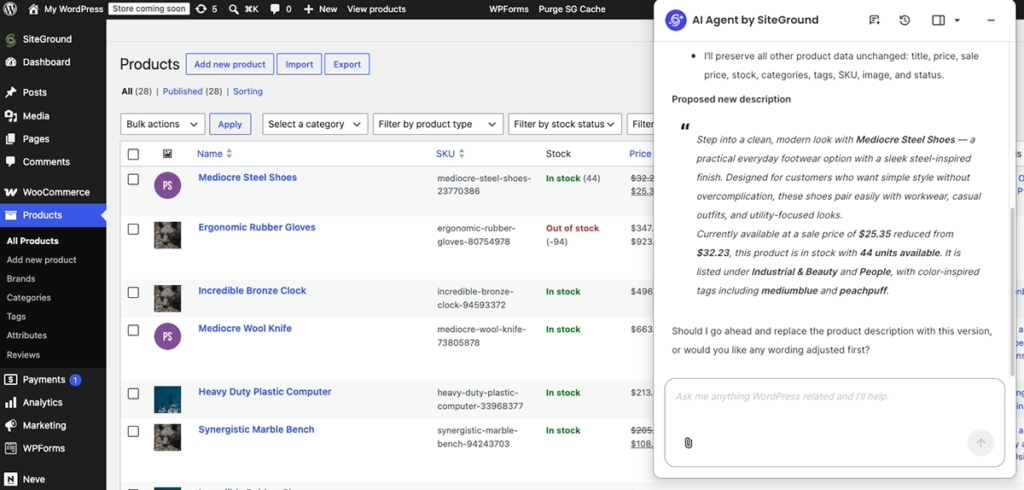
That combination is the point. You can explore how the agent spans WordPress and WooCommerce in our product announcement.
AI Agent for WordPress vs WooCommerce AI plugin: how they compare
Here’s how the five kinds of WooCommerce AI plugins compare with AI Agent for WordPress’s WooCommerce capabilities, dimension by dimension:
| Dimension | WooCommerce AI plugins | AI Agent for WordPress |
|---|---|---|
| Who it helps | Shoppers (chat, search, recommendations) or the owner (content, automation, store agents) | The store owner and site administrators |
| Where you use it | A storefront widget, a panel in the product editor, a plugin screen, or an AI assistant you connect | A chat pop-up in the WordPress admin |
| Product content creation | Write product descriptions and other product fields, usually from a button in the product editor | Writes and rewrites product descriptions from chat, for one product or a whole category |
| Shopper chat and recommendations | Answer shoppers’ questions and recommend products on the storefront | Doesn’t chat with site visitors or recommend products to them |
| Managing WooCommerce products, prices, orders, and coupons | Store agents create and update products and change orders. Content, chat, search, and automation tools don’t | Creates and updates products, including from an uploaded spreadsheet. Sets sale prices, creates coupons, and updates order status |
| Tax, shipping, and payment settings | Read or change these settings only if the plugin supports it | Can’t view or change tax rates, shipping zones, or payment methods |
| Sales reports | Report on sales in some suites and store agents | Reports best-sellers, quantities, and totals for any period you ask about |
| The WordPress site around the store | Stay inside WooCommerce, so pages, menus, and plugins are usually outside their job | Manages posts, pages, menus, plugins, users, and settings from the same chat |
| Automation | Send messages and run tasks automatically, based on triggers and schedules | Acts on request only and doesn’t run scheduled tasks |
| Changes across multiple stores | Run separately on each store where they’re installed | Runs any action across all your connected sites from one request, such as comparing sales or updating products in every store |
| Confirmation before changes | Handle approvals differently from tool to tool | Asks before changing your store, and needs Power Mode on for changes like editing products |
| Setup and cost | Install as a plugin or connect as a service, with pricing set by each vendor and free tiers on some | Installs as the AI Agent by SiteGround plugin with no API key. Includes 20,000 free tokens a month with SiteGround hosting, or a 14-day trial with 20,000 tokens |
Good to know: AI Agent for WordPress asks before it changes your store. With Power Mode switched off, it asks you to turn it on before applying product edits, and it still confirms before acting if you tell it not to ask. Learn how Power Mode protects a live store.
The differences that decide it
Three differences matter most:
- Who each tool helps
- Whether it can work beyond your store
- How much time you need to spend setting it up.
AI for WooCommerce shoppers or store owners
A WooCommerce AI plugin often helps your shoppers, while AI Agent for WordPress helps you. This is the first big difference to settle, because it’s about two completely separate jobs.
Tidio is a good example of the shopper side. It’s a live chat and customer support platform for online stores, and its AI assistant, Lyro, answers shoppers’ questions in a chat window on your storefront and recommends products from your catalog.
We installed Tidio on a test store to see Lyro in practice. Setup took a few minutes: a short wizard, a link to the store so Lyro could learn from it, and the Tidio plugin connected to WooCommerce. When we asked Lyro on the storefront for a landscape photo, it replied with product cards from the store’s catalog.

That’s real value AI Agent for WordPress doesn’t offer. Tidio states that the first 50 Lyro conversations are free, and that product recommendations need a paid Lyro plan. In its default setup on our test store, when we asked Lyro about an order, it said it couldn’t check it. Tidio does let you connect Lyro to outside services through what it calls Actions.
AI Agent for WordPress never appears on your storefront. It sits in your admin and acts on your instructions, so a shopper’s question still needs a person or a chat tool to answer it.
One WooCommerce task or WooCommerce and WordPress together
Most WooCommerce AI plugins do one job inside the store, and AI Agent for WordPress can carry a single request from the store into the rest of the site. With AI Agent for WordPress, store management doesn’t stop at WooCommerce.
Store work rarely ends at the product catalog. A sale needs a discount, but it also needs a homepage announcement and a page shoppers can find from the menu. Here’s one request in the AI Agent for WordPress chat that covers all of it:
Create a 20% coupon called PEOPLE20 for the People collection. Then add a section at the top of the homepage announcing the coupon code, create a Sale page that shows the products on sale, and add it to the main menu.
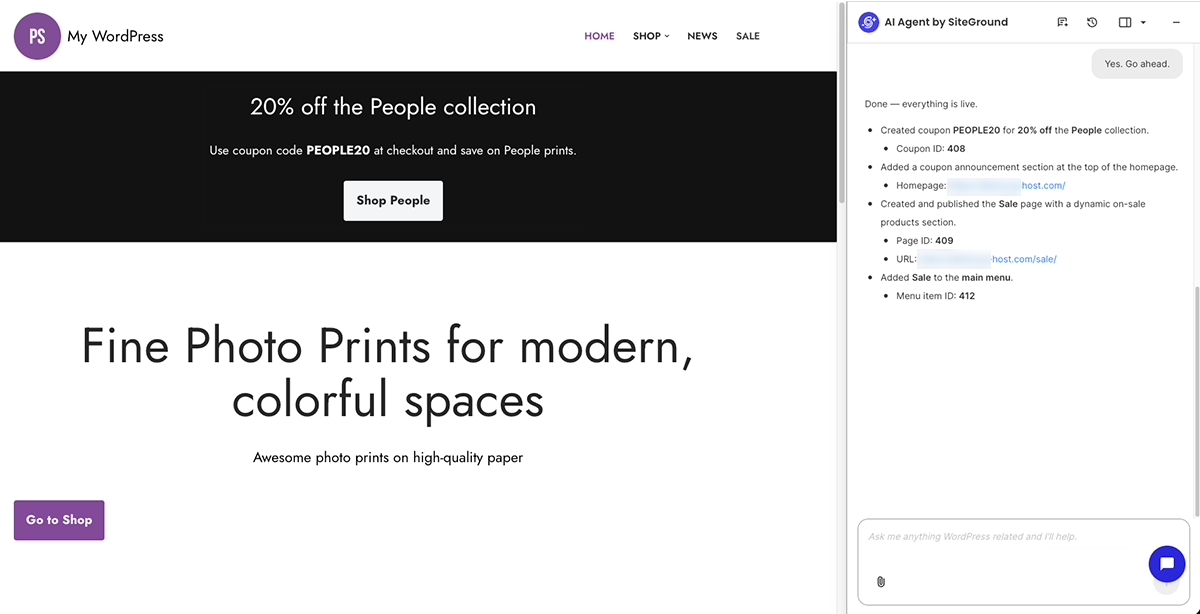
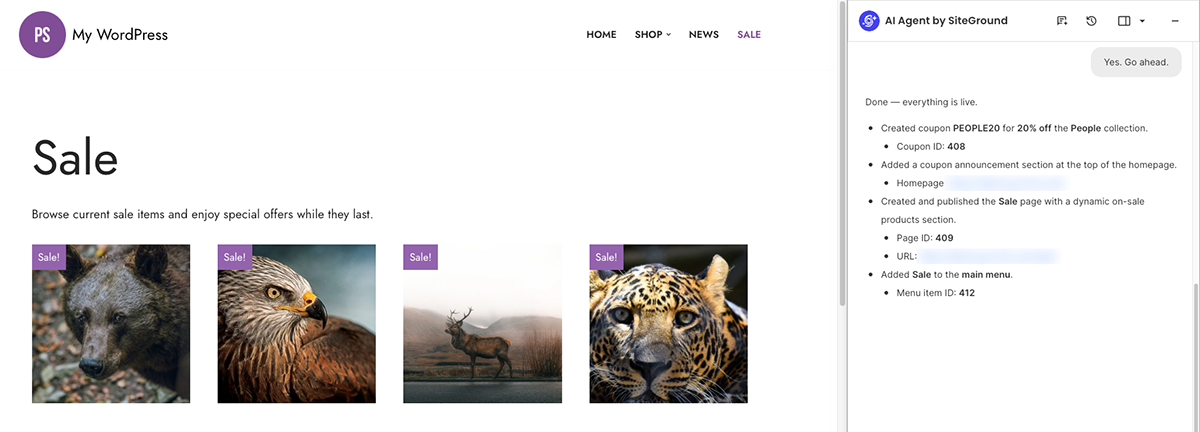
AI Agent for WordPress lists its plan and asks you to confirm. It then creates the coupon, adds an announcement section to the top of the homepage, publishes a Sale page that lists the store’s on-sale products, and adds Sale to the main menu.
Here’s the homepage after the update:
And here’s what the new Sale page looks like:
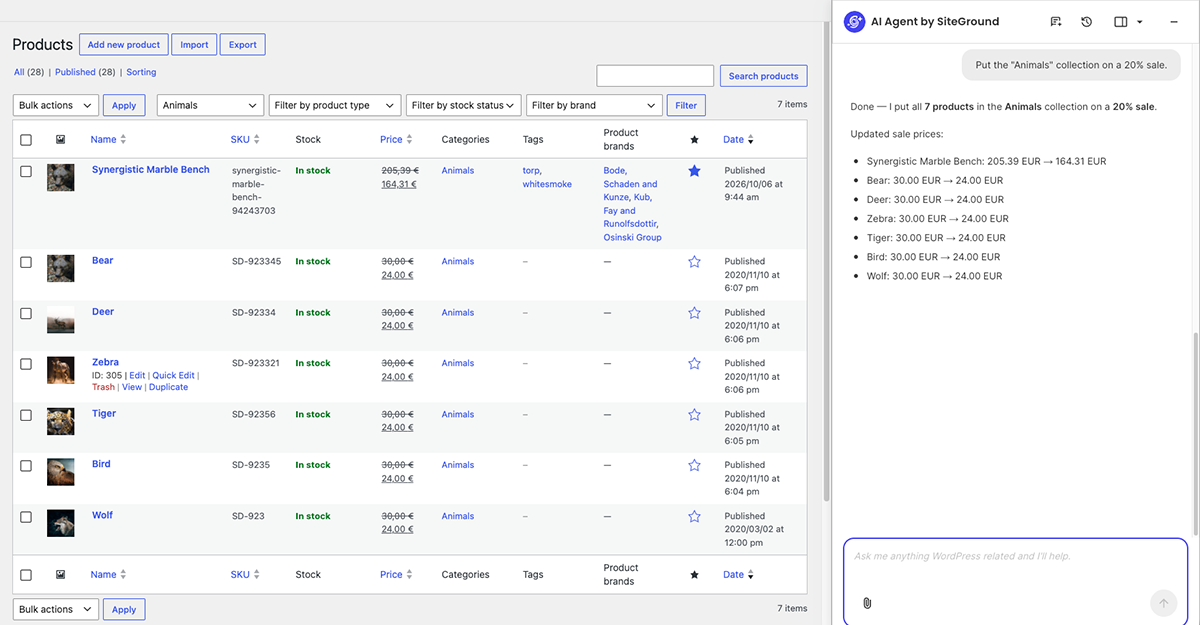
Store-only jobs work the same way. AI Agent for WordPress rewrites the descriptions of all products in a category in one request. It also puts a whole collection on a 20% sale, creates a coupon limited to one category with an expiry date, and marks orders completed.
Pro tip: Look back at last week in your store and sort each job into two lists: questions a shopper needed answered, and changes you had to make yourself. The longer list tells you which kind of tool to try first.
WooCommerce AI store management: Ready-made or connected?
WooCommerce AI store management is possible without AI Agent for WordPress, but it usually means connecting and configuring an AI assistant yourself. WooCommerce now ships its own MCP (Model Context Protocol, an open standard that lets an AI assistant like Claude or ChatGPT act on other software).
WooCommerce’s MCP is real and capable. According to WooCommerce’s documentation, its built-in abilities can find, create, update, and delete products, find orders, update order status, and add order notes. That last one is something AI Agent for WordPress can’t do.
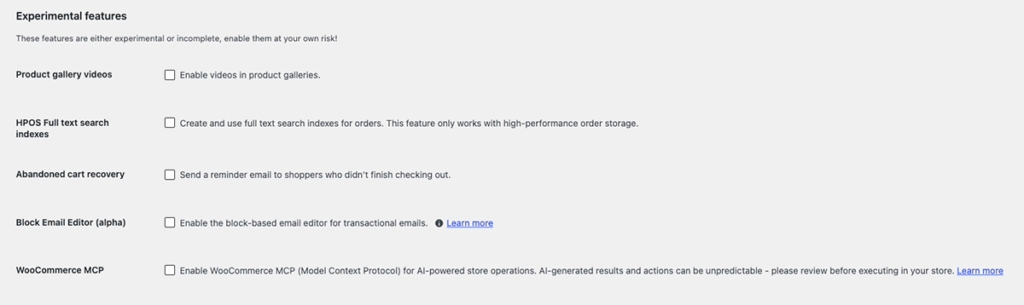
It’s also early in its development. WooCommerce describes its MCP as a developer preview, and in WooCommerce 11.1.2 the setting sits under Experimental features. To connect a store, you create a WordPress Application Password and add a small Node.js proxy to your AI assistant’s settings, which is developer work for most store owners.
Conversational store agents built on WooCommerce’s MCP take care of that setup for you. CommerceBird, for example, states that its AI can create orders, create and update products, and report analytics through conversation, as part of a paid platform bundled with ERP and B2B integrations. Like other store agents, it’s built for the store itself.
AI Agent for WordPress works out of the box. You install the AI Agent by SiteGround plugin, connect the site to AI Studio, and start typing in the WordPress admin, with no API key or assistant configuration.
What AI Agent for WordPress won’t do in your store
AI Agent for WordPress covers WooCommerce operations involving products, prices, coupons, orders, and reports, but a few parts of a store are still out of reach:
- Order notes. AI Agent for WordPress can update an order’s status, but it can’t add a note to the order.
- Editing product variations. It can list and read variations, but it can’t change them, including a variation’s price.
- Tax, shipping, and payment settings. It has no access to tax rates, shipping zones, or payment methods, not even to view them.
- Chat with site visitors. It helps you in the admin and never appears on the storefront.
- Scheduled or unattended tasks. It acts when you ask, not on a timer.
Each gap has an owner. WooCommerce’s own screens handle notes, variations, and settings in a few clicks, and WooCommerce’s MCP can add order notes for anyone running it. Chat assistants handle shoppers, and automation tools send follow-ups on their own.
Can you use a WooCommerce AI plugin and AI Agent for WordPress together?
Yes, a WooCommerce AI plugin and AI Agent for WordPress can run side by side, because they don’t compete for the same job. We successfully ran a test store with Tidio on the storefront and AI Agent for WordPress in the admin.
The split is simple. A shopper-facing plugin answers questions and suggests products to visitors. AI Agent for WordPress handles what you’d otherwise click through yourself: repricing a collection, setting up a coupon, checking last month’s best-sellers, or adding a page to the menu.
Treating SiteGround AI Agent vs WooCommerce AI plugin as an either-or choice only makes sense when both would do the same job. We have a separate comparison if you want to understand specialized plugins versus AI agents beyond WooCommerce.
Which AI tool fits your WooCommerce store?
The right choice depends on where your time goes: helping shoppers find and buy, or running the store and the site behind it.
When to choose a WooCommerce AI plugin
A WooCommerce AI plugin makes sense when one specific job takes most of your time, especially one that happens on the storefront. Choose one if:
- You want shopper questions answered around the clock. A chat assistant handles questions about products and stock while you’re away.
- You want smarter store search. AI search tools help shoppers find products even when they don’t use your exact product names.
- You want product recommendations on the storefront. Recommendation tools suggest related products during browsing or in chat.
- You want follow-ups that run on their own. Automation tools send abandoned cart reminders and other follow-up messages without you starting them.
When to choose AI Agent for WordPress
AI Agent for WordPress fits when your bottleneck is the work of managing your WooCommerce store, and that work spills into the rest of your site. As a WordPress AI agent for WooCommerce, it suits you if:
- You want store changes made by chat. Repricing a collection, creating a coupon, or updating order status takes one request instead of a round of admin screens.
- Your store work reaches into pages and menus. One request can create a promotion, announce it on the homepage, and add a Sale page to the menu.
- You run more than one store. One request can make the same change or pull the same report across all your connected stores, which helps when you’re running several WooCommerce stores from one workspace.
- You’d rather not configure an AI assistant. It works out of the box, with no API key.
WooCommerce AI plugins or WordPress-wide management?
AI Agent for WordPress vs WooCommerce AI plugin isn’t a contest between better and worse tools. It’s a question of whether you need AI that helps your shoppers or AI that helps you run your store and website.
If your time goes to answering shoppers, improving search, or sending automated follow-ups, a specialized WooCommerce AI plugin is the stronger choice. Each one does its job on the storefront or in the background, where AI Agent for WordPress doesn’t work.
If your time goes to repricing products, setting up promotions, processing orders, and keeping the pages around them current, AI Agent for WordPress does that work by chat. And because it reaches beyond WooCommerce, one request can run a whole promotion from the coupon to the menu.
Frequently asked questions
Store owners should choose AI Agent for WordPress for store operations they run from the admin, such as products, prices, coupons, orders, reports, and the pages around them. They should choose a WooCommerce AI plugin for one specialized job, especially shopper-facing ones like chat, search, and recommendations.
The difference between AI Agent for WordPress and a WooCommerce AI plugin is who the tool helps and how much of the site it reaches. Most WooCommerce AI plugins do one job, often to help shoppers. AI Agent for WordPress helps the store owner across WooCommerce and the WordPress site.
Yes. AI Agent for WordPress can manage a WooCommerce store’s products, sale prices, coupons, orders, and sales reports from a chat request. It can’t edit product variations, add order notes, or change tax, shipping, or payment settings.
AI Agent for WordPress can carry one request from the store into the rest of the site, such as creating a coupon, announcing it on the homepage, and adding a Sale page to the main menu. It can also make the same change across multiple connected stores with one request. A typical WooCommerce AI plugin stays inside one job in one store.
Yes. AI Agent for WordPress manages WooCommerce and the rest of your WordPress site from the same chat, including posts, pages, menus, plugins, users, and settings.
No. AI Agent for WordPress can’t answer your shoppers, because it helps store owners in the WordPress admin and SiteGround AI Studio, not site visitors. Shopper chat is a job for a dedicated chat plugin.
Yes. You can use a WooCommerce AI plugin and AI Agent for WordPress together, with the plugin helping shoppers on the storefront and AI Agent for WordPress handling store and site work in the admin.
Yes. AI Agent for WordPress can compare sales across multiple WooCommerce stores with one instruction when all connected sites are selected in SiteGround AI Studio.
No. You don’t need an API key to use AI Agent for WordPress with WooCommerce. SiteGround hosting customers get 20,000 free tokens a month, and anyone else can start a 14-day trial with 20,000 tokens.





Comments ( 0 )
Thanks! Your comment will be held for moderation and will be shortly published, if it is related to this blog article. Comments for support inquiries or issues will not be published, if you have such please report it through our official channels of communication.
Leave a comment
Thanks! Your comment will be held for moderation and will be shortly published, if it is related to this blog article. Comments for support inquiries or issues will not be published, if you have such please report it through our official channels of communication.