AI Agent for WordPress vs AI Engine: Managed WordPress agent or AI framework?
-
- What AI Engine and AI Agent for WordPress are built for
- How each one works: a managed agent or a configurable AI framework
- AI Agent for WordPress vs AI Engine: how they compare
- The differences that decide it
- Managing multiple WordPress sites
- Which WordPress AI tool should you choose?
- Build with a framework or hand the work to an agent
- Frequently asked questions
You want AI to take on the routine work of running a WordPress site: publishing posts, updating plugins, checking orders. Two products now offer that in very different ways, one as a finished agent and the other as a set of building blocks. Which one fits the way you work?
AI Agent for WordPress vs AI Engine rests on who supplies the AI and who does the setup. SiteGround’s AI Agent for WordPress is a ready-to-use AI agent powered by SiteGround AI Studio that manages your site through chat. AI Engine, from Meow Apps, is a configurable AI framework that works through its Workspace with your own API key, or lets an AI assistant you connect, such as Claude or ChatGPT, manage the site through MCP.
Key takeaways:
- AI Agent for WordPress vs AI Engine is a choice between a managed WordPress agent and a configurable AI framework. AI Agent for WordPress arrives set up to manage your site, while AI Engine gives you the parts to build with.
- Both handle everyday content work. In our test, both created a post, edited a page, set a featured image, and moderated a comment.
- AI Engine’s free version covers core WordPress tasks. Anything beyond those requires AI Engine Pro, from $79 a year, including WooCommerce, theme, plugin, and database tools.
- AI Engine is the stronger choice for building AI features. Visitor chatbots, AI forms, and a free choice of AI provider make it a developer’s toolkit, while AI Agent for WordPress is built for running the site.
What AI Engine and AI Agent for WordPress are built for
The two products belong to different categories. AI Engine is a toolkit for building AI-powered features on a WordPress site, and AI Agent for WordPress is an agent for running one.
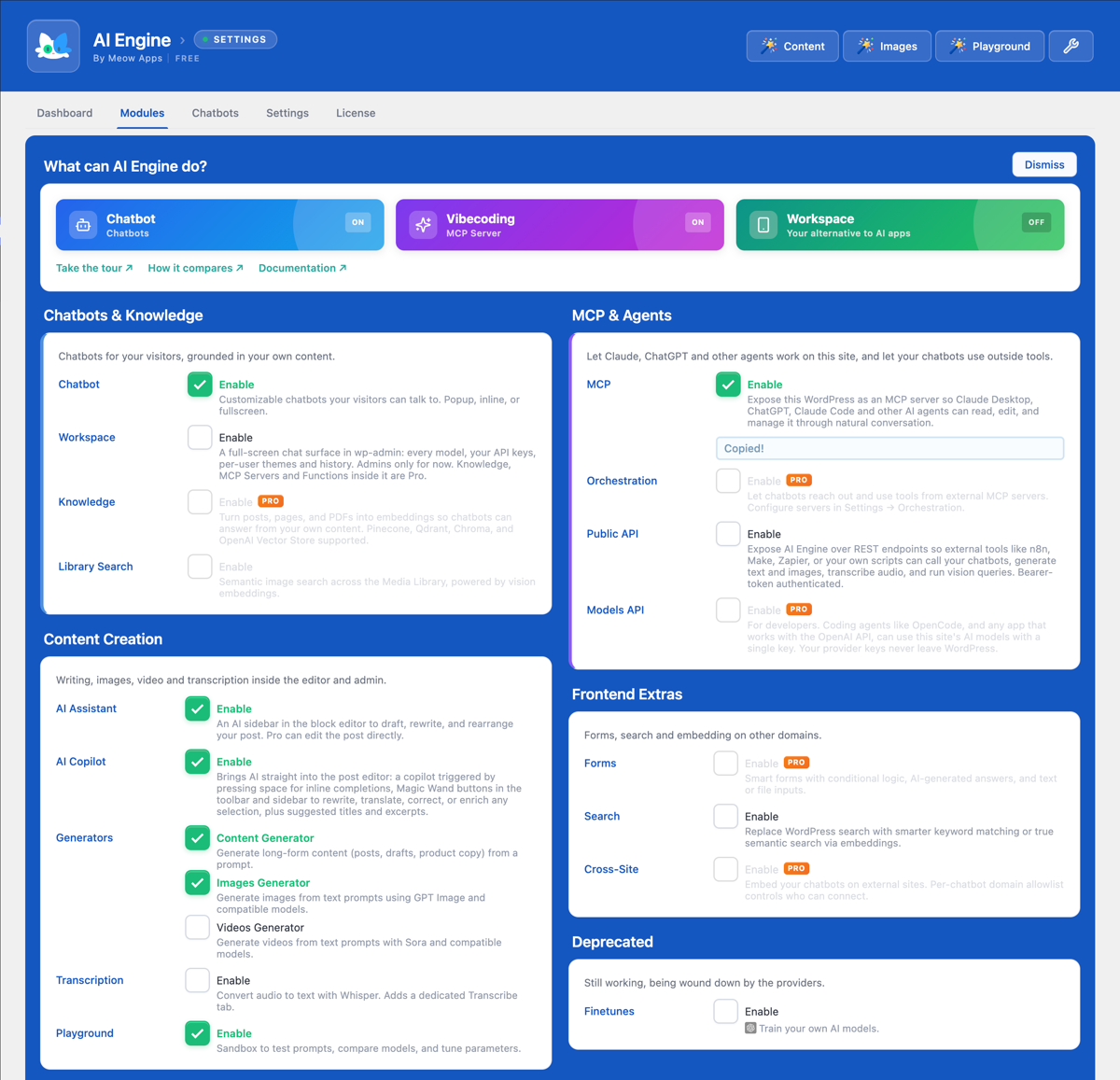
AI Engine is a configurable WordPress AI framework from Meow Apps. Its modules cover chatbots for your visitors, an AI chat inside WordPress admin called Workspace, content and image generation, AI forms, knowledge bases built from your own content, custom functions, and an MCP server.
You switch on the modules you need, and most of them run on an API key from an AI provider such as OpenAI or Anthropic. The free version includes the MCP server and the core WordPress tools. On the other hand, knowledge bases, AI forms, and the WooCommerce, theme, plugin, and database tools require AI Engine Pro.
AI Engine can also act as the AI provider behind WordPress’s built-in AI Client, which arrived in WordPress 7.0. In that role, it supplies the AI models that other WordPress features call on. WordPress’s own AI plugin is a different route to built-in AI features, and AI Agent for WordPress vs the official WordPress AI plugin covers that choice.
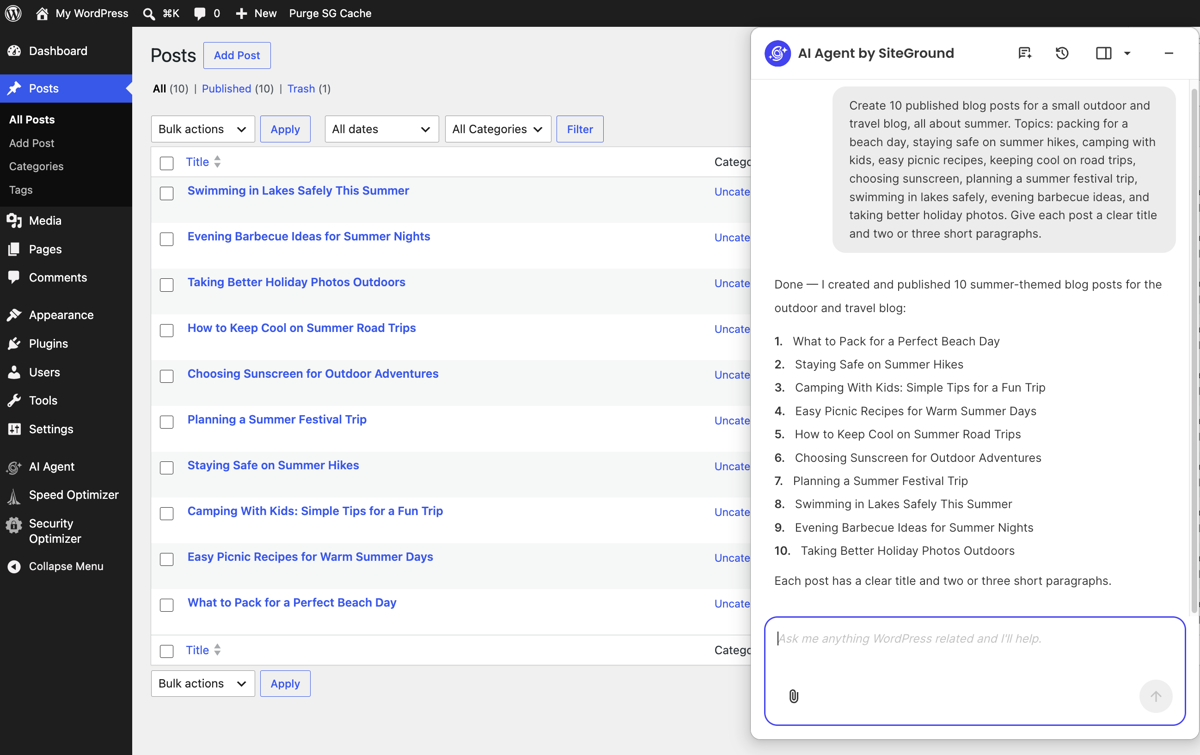
AI Agent for WordPress is SiteGround’s AI agent, powered by SiteGround AI Studio. You install the AI Agent by SiteGround plugin, connect the site to AI Studio, and then chat with the agent in a pop-up inside WordPress admin, or from the AI Studio dashboard when you work across sites.
It creates and edits content, manages plugins, themes, users, and settings, and handles WooCommerce work, with no API key to set up. AI Studio includes the tokens the agent uses: SiteGround hosting customers get 20,000 free tokens a month, and anyone else can start a 14-day free trial with 20,000 tokens. For everything the agent does, see how SiteGround’s agent operates.
How each one works: a managed agent or a configurable AI framework
The practical difference is where the AI comes from and who connects it to your site.
With AI Agent for WordPress, the agent is part of the product. Access to AI models, the WordPress tools, and the safety controls come set up, and AI Studio tokens cover the cost.
With AI Engine, the plugin provides the WordPress tools and you decide which AI uses them. You can do that in two ways:
- Through AI Engine Workspace. Workspace is AI Engine’s chat inside WordPress admin. Meow Apps states it can work on the site with the free plugin, using AI models you connect with your own API key, and that it asks before running anything that changes the site.
- Through MCP. MCP (Model Context Protocol) is an open standard that lets an AI assistant use tools in another app. AI Engine turns your site into an MCP server, so Claude, ChatGPT, or another AI assistant you connect can read and change it through conversation.
That choice decides who you pay, what you set up, and who you contact when something breaks. With Workspace, you pay your AI provider for every request. With MCP, you pay for the AI assistant’s plan, and a connection problem can sit with the plugin, your host, or the assistant.
AI Agent for WordPress keeps all of that with one company. One AI Studio account covers the AI, the tools, and the tokens.
Good to know: connecting Claude or ChatGPT through MCP needs no API key in AI Engine, because that assistant does the work. AI Engine’s image generation and image analysis tools are the exception. In our test, both returned an error asking for an API key.
AI Agent for WordPress vs AI Engine: how they compare
Side by side, the two products differ most on who provides the AI, what the free version covers, and how they handle stores and work across more than one site.
| Dimension | AI Engine | AI Agent for WordPress |
|---|---|---|
| What it is | A configurable WordPress AI framework and MCP server | A ready-to-use AI agent for managing WordPress |
| Which AI does the work | Models you connect with your own API key (Workspace), or an AI assistant you connect through MCP | The agent itself, powered by SiteGround AI Studio |
| Host requirement | Any host | Any host |
| Setup | Install the plugin, enable modules, add an API key or connect an AI assistant through OAuth or a bearer token | Install the plugin and connect it, a few clicks on SiteGround hosting |
| What you pay for | AI Engine Pro if you need it, plus your AI provider’s usage or your AI assistant’s plan | AI Studio tokens: 20,000 free a month with SiteGround hosting, or a 14-day trial with 20,000 tokens |
| What the free version covers | 42 core WordPress tools through MCP: posts, pages, media, comments, users, taxonomies, and settings | The full agent, within your token allowance |
| WooCommerce | No WooCommerce tools in the free version; AI Engine Pro adds them | Orders, products, coupons, and sales reports |
| Themes and plugins | Not available through MCP in the free version; AI Engine Pro adds them | Full theme and plugin management, including installation, updates, and theme switching |
| Use on more than one site | One install per site; AI Engine Pro is licensed by the number of sites | All connected sites in one AI Studio workspace |
| One instruction across several sites | Each site runs its own MCP server, so it depends on the AI assistant you connect | Yes, for example updating a plugin on every connected site |
| Safeguards for high-impact actions | Workspace asks before running tools that change the site | Power Mode is off by default, and the agent asks before impactful actions |
| Per-user access | Each person connects with their own WordPress account, and editors can be given access limited to content | Any administrator, each with their own account |
| Choice of AI model | OpenAI, Anthropic, Google, Mistral, Perplexity, OpenRouter, or the AI assistant you connect | As of November 2026. Text: Gemini 3.8 Flash, GPT 6 Luna, Claude Sonnet 5.5, Claude Opus 5.5, Gemini 3.1 Pro, Gemini 2.5 Pro, GPT 6.1 Sol. Images: GPT Image 2.5 Sunburst, GPT Image 2.5 Flare, Nano Banana 2 Lite, Nano Banana Pro |
| Best for | Developers building AI features into a site | Site owners, stores, and agencies managing sites |
The differences that decide it
On basic content work, AI Engine and AI Agent for WordPress perform alike. The gap opens on setup, on what you can do beyond posts and pages, and on running a store.
Setup and the time to your first task
AI Agent for WordPress takes a few clicks to connect on SiteGround hosting. On another host, you install the AI Agent by SiteGround plugin and paste a connection key from AI Studio, following the steps to connect your WordPress site to SiteGround AI Studio.
AI Engine installs from the WordPress plugin directory just as easily. Connecting an AI assistant takes more steps: you enable the MCP server, then connect through OAuth, where each person signs in with their WordPress account, or through a bearer token, one shared secret for every call.
In our test, OAuth didn’t connect on either of two different hosts, and the bearer-token method worked. Meow Apps lists a blocked /.well-known/ path among the known causes of MCP connection problems.
If you use Workspace, chatbots, or content generation, you also add an API key from an AI provider and manage its billing yourself. That brings its own trade-offs, and you can use AI in WordPress without your own API key if you’d rather skip that step.
Pro tip: count the accounts you need before you start. AI Agent for WordPress needs an AI Studio account. AI Engine needs a plan for the AI assistant you connect through MCP, plus an API key from an AI provider if you use Workspace, chatbots, content generation, or forms.
What each can do out of the box
We ran the same four tasks through AI Engine’s free version, with Claude connected through MCP, and through AI Agent for WordPress:
- create a draft post with a category and tags
- edit an existing page and add a sentence that links to the new post
- set a featured image from the Media Library
- find a pending comment and approve it
For the draft post, both products created it and applied the category and tags, creating the terms where they didn’t exist. Both completed all four tasks.
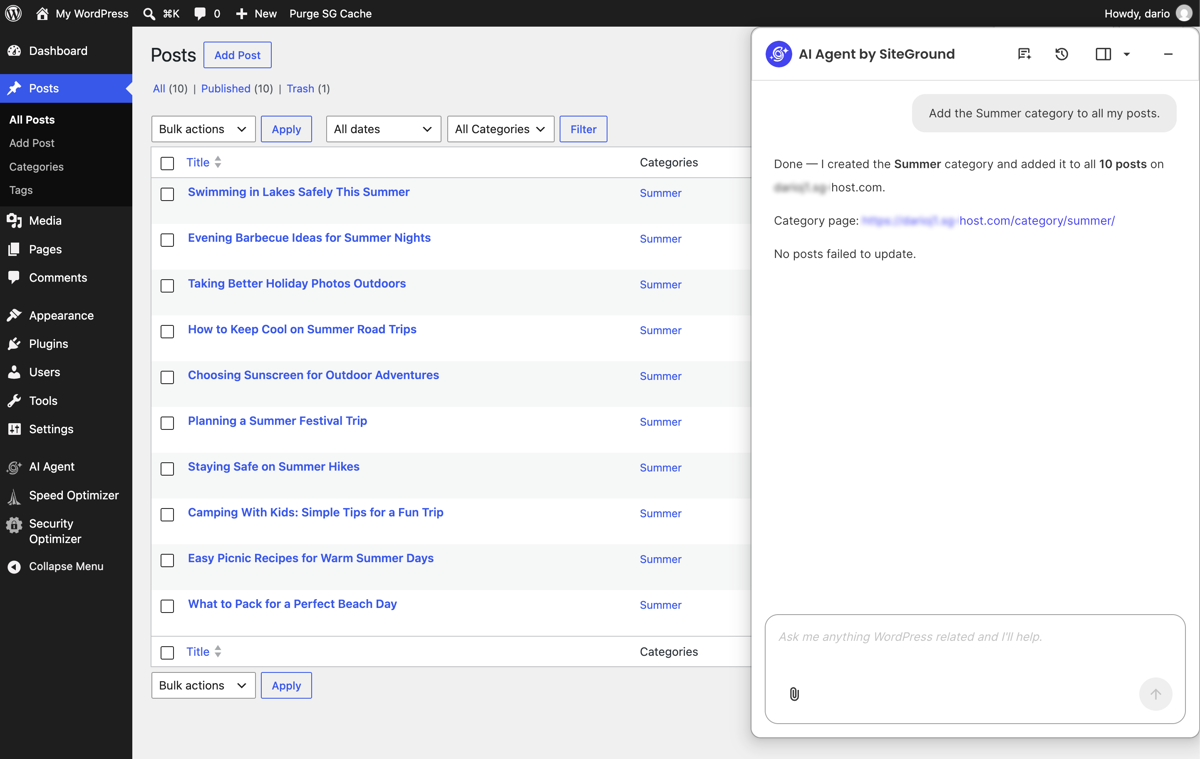
AI Agent for WordPress also handles changes across the whole site in one request. Given the prompt “Add the Summer category to all my posts,” it creates the category, adds it to every post, and confirms that none failed to update.
Beyond posts and pages, AI Engine’s free version stops at the core WordPress tools. Switching themes and installing plugins aren’t available through MCP on the free version, and the Themes and Plugins tools come with AI Engine Pro. Deleting users isn’t among the free tools either.
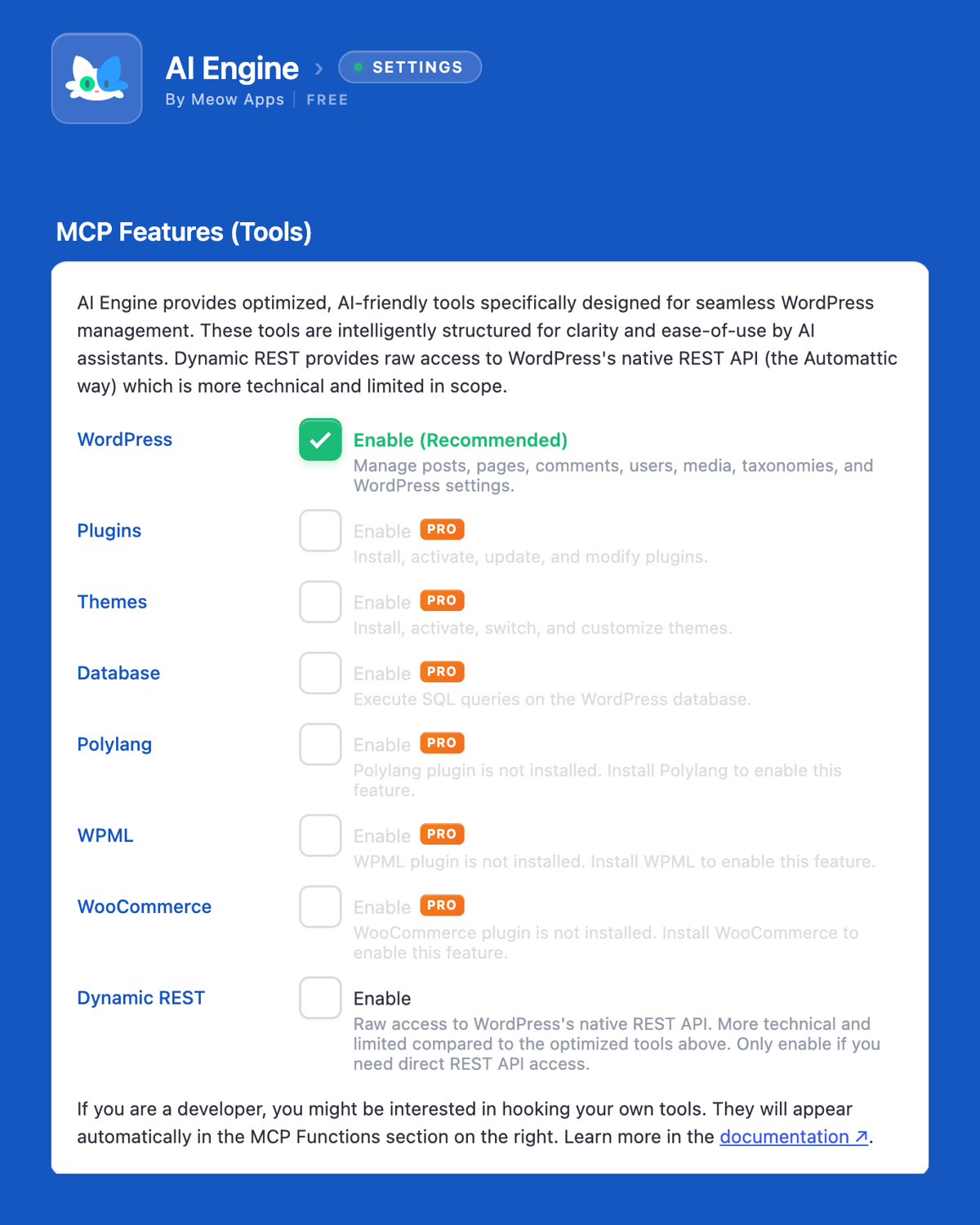
AI Agent for WordPress handles theme switching, plugin installs, and user deletion out of the box. Power Mode, which is off by default, makes the agent pause and ask before impactful actions such as deleting plugins or changing settings. You can read how Power Mode protects your site from risky changes.
Two smaller points round out the picture:
- Images. AI Agent for WordPress generates images and adds them to your site with no API key. AI Engine’s image tools need one, even through MCP.
- Custom post types. Both products create posts in existing custom post types and update custom fields. Neither creates new post types, taxonomies, or custom fields, which takes a separate plugin.
WooCommerce store management
AI Agent for WordPress works with your store out of the box. It checks orders, edits products in bulk, and manages coupons and sales reports. Editing variable product variations is more limited.
AI Engine’s free version has no WooCommerce tools. Products can be edited as ordinary posts, but orders are out of reach. AI Engine Pro adds WooCommerce tools for an AI assistant to use.
Neither product manages tax rates, shipping zones, or payment gateways, so you’ll still set those up in WooCommerce itself.
Managing multiple WordPress sites
Licensing and day-to-day management are separate questions here.
AI Engine Pro is licensed by the number of sites: $79 a year for one site, $99 for five, and $179 for 20. Each site runs its own MCP server, so how an AI assistant works across several of them depends on that assistant.
AI Agent for WordPress connects multiple sites to one AI Studio workspace, and one instruction can act across all of them. For example, it can update a plugin on every site in a portfolio or add a user to each connected site. It works with standalone WordPress installs, not Multisite networks.
Which WordPress AI tool should you choose?
The deciding question is whether you want to manage a site or build AI features into it.
When to choose AI Engine
AI Engine makes sense when your goal is advanced AI development on your site. Choose it if:
- You want chatbots for your visitors. AI Engine’s chatbots can sit on any page, and AI Engine Pro can train them on your own posts and PDFs.
- You build custom AI features. Its PHP API and REST endpoints let developers put AI into the site’s own logic.
- You want to pick your AI provider. It works with OpenAI, Anthropic, Google, Mistral, Perplexity, and OpenRouter, or with Claude or ChatGPT through MCP.
- You want editors to use AI too. AI Engine can let editors connect with their own accounts, limited to content work.
If what you need is an agent for deeper technical work rather than a framework, the AI Agent for WordPress vs Genwave comparison covers that choice.
When to choose AI Agent for WordPress
AI Agent for WordPress fits site owners and small businesses whose goal is managing the site through chat. Choose it if:
- You’d rather not manage API keys. One AI Studio account covers the AI, and tokens are included.
- You run a WooCommerce store. It works with orders, products, coupons, and sales reports out of the box.
- You look after multiple sites. One AI Studio workspace covers all of them, and one instruction can update a plugin on each.
- You want themes and plugins handled too. It installs and updates them and switches themes, and Power Mode asks before impactful changes.
Build with a framework or hand the work to an agent
AI Agent for WordPress vs AI Engine is a choice between a ready-to-use agent and a framework you build with. AI Engine gives developers visitor chatbots, AI forms, any AI provider, and an MCP server, and its free version already handles core WordPress tasks.
If you want to manage your site through chat, with WooCommerce, themes, plugins, and several sites handled with one instruction, and no API key to set up, AI Agent for WordPress does the work for you.
Frequently asked questions
Choose AI Agent for WordPress if you want an AI agent that manages your site out of the box. Choose AI Engine if you want a framework for building advanced AI features and are comfortable connecting and configuring the AI yourself.
Yes. AI Engine can manage a WordPress site in two ways: from Workspace, its own chat inside WordPress admin, or through an AI assistant such as Claude or ChatGPT connected through MCP. The free version covers core WordPress tasks: posts, pages, media, comments, and users. Anything beyond those requires AI Engine Pro, including WooCommerce, theme, plugin, and database management.
Yes. AI Engine can manage WordPress without the Claude or ChatGPT apps through AI Engine Workspace, its own chat inside WordPress admin. Workspace uses AI models you connect with an API key from a provider such as OpenAI, Anthropic, or Google.
It depends on the feature. AI Engine’s chatbots, content generation, AI forms, and Workspace need an API key from an AI provider. Connecting Claude or ChatGPT through MCP doesn’t, because that assistant does the work, although the image generation and image analysis tools still need a key.
Yes. AI Engine’s MCP server for WordPress is included in the free version, with 42 core WordPress tools. Anything beyond those requires AI Engine Pro, from $79 a year for one site, including tools for WooCommerce, themes, plugins, the database, and multilingual sites.
AI Agent for WordPress is better for WooCommerce management out of the box, because it works with orders, products, coupons, and sales reports. AI Engine’s free version has no WooCommerce tools, and AI Engine Pro adds them.
AI Agent for WordPress is easier for nontechnical users. It needs no API key and connects in a few steps, while AI Engine asks you to choose, connect, and configure the AI yourself.
AI Agent for WordPress is better for managing multiple WordPress sites from one place, because one instruction can act on all connected sites, for example updating a plugin on each. With AI Engine, each site runs its own MCP server, so working across sites depends on the AI assistant you connect.
AI Engine can power chatbots for your site’s visitors, trained on your own content, and AI forms, and it lets you pick any supported AI provider. It can also give editors access limited to content, while AI Agent for WordPress is for administrators.
Yes. AI Agent for WordPress works on sites hosted anywhere once the site is connected to SiteGround AI Studio with the AI Agent by SiteGround plugin and a connection key.



Comments ( 0 )
Thanks! Your comment will be held for moderation and will be shortly published, if it is related to this blog article. Comments for support inquiries or issues will not be published, if you have such please report it through our official channels of communication.
Leave a comment
Thanks! Your comment will be held for moderation and will be shortly published, if it is related to this blog article. Comments for support inquiries or issues will not be published, if you have such please report it through our official channels of communication.